In the fast-paced world of industrial networking, maximizing performance is crucial. One often-overlooked element that can significantly enhance your network’s efficiency is jumbo frame support. But what exactly are jumbo frames, and how can they benefit your industrial Ethernet network?
Understanding Jumbo Frames and Their Impact on Ethernet Networks
The Maximum Transmission Unit (MTU) determines the largest size of data packets that can be transmitted over a network. Standard Ethernet frames usually have an MTU of 1500 bytes, which includes both the frame header and payload. Jumbo frames, however, can support an MTU of up to 9000 bytes or even more.
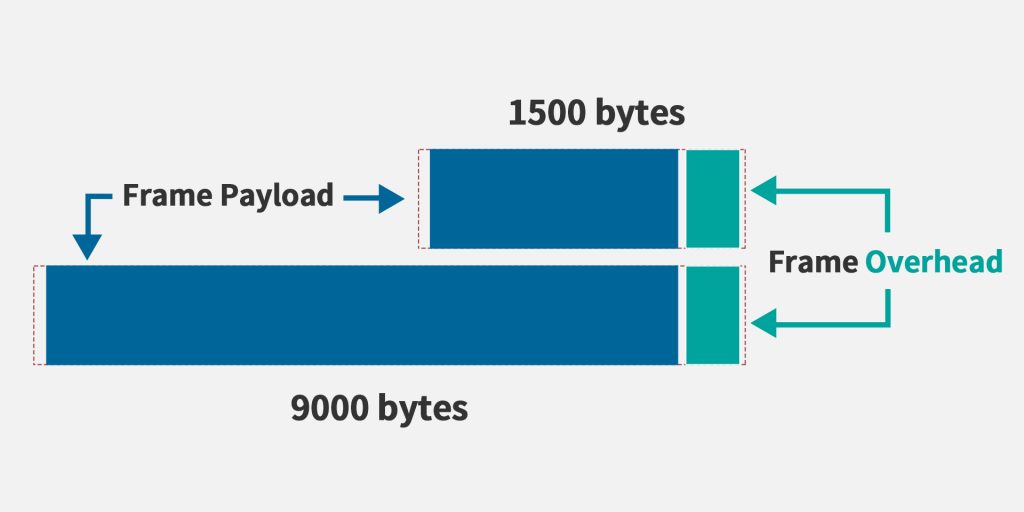
Jumbo frames are particularly advantageous in industrial automation. They can improve control systems’ efficiency by reducing the number of packets needed to transmit control signals and sensor data. In smart city applications or remote monitoring systems, jumbo frames facilitate the more efficient transmission of large data sets such as video surveillance footage and weather data.
How Jumbo Frames Benefit Industrial Ethernet Switches
Utilizing jumbo frames can offer several key advantages:
Reduced Overhead: Jumbo frames allow for a larger data payload per frame compared to standard Ethernet frames. This results in a higher proportion of each frame being dedicated to actual data, which reduces the overhead of transmitting smaller frames. This leads to improved efficiency and reduced latency.
Improved Efficiency: By cutting down the number of frames needed for data transmission, jumbo frames enhance overall network efficiency. This is especially beneficial in environments requiring rapid and reliable transmission of large data sets, such as industrial automation or outdoor monitoring systems.
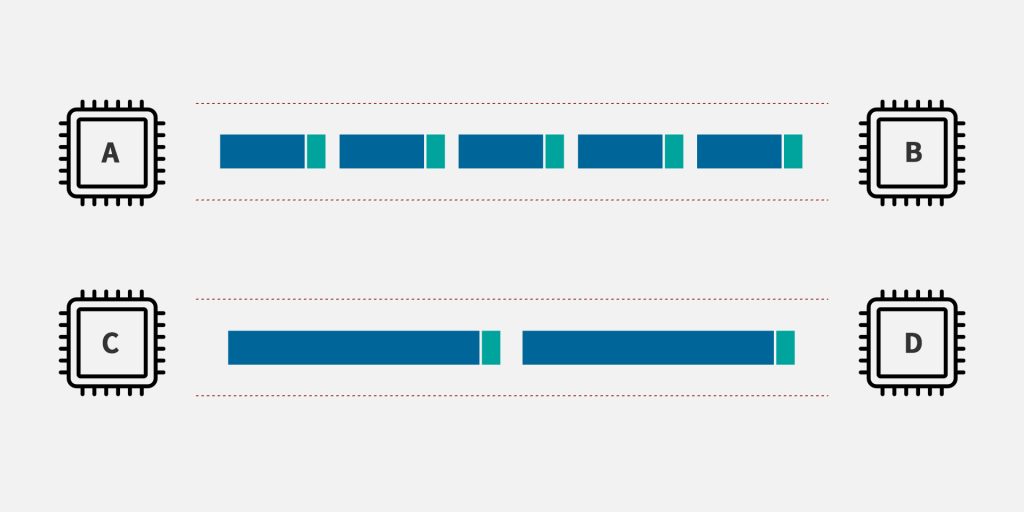
Enhanced Throughput: With fewer frames to manage, jumbo frames can boost the network’s overall throughput. This is advantageous for high-bandwidth applications, including video streaming and data center networking.
Lower CPU Utilization: Transmitting fewer, larger frames reduces the processing load on network devices’ CPUs. This leads to better system performance and reduced power consumption.
Enabling Jumbo Frames
To enable jumbo frames on your devices, follow these steps:
Switches: Access the switch’s management interface, typically through a web browser or command-line interface (CLI). Locate the settings for jumbo frames or MTU size, and set the MTU size to a value greater than the standard 1500 bytes, such as 9000 bytes for jumbo frames.
Routers: Similarly, access the router’s management interface and adjust the MTU size to enable jumbo frames.
It’s important to note that not all devices and networks support jumbo frames. Compatibility issues can arise if devices that do not support jumbo frames are part of the network. Additionally, enabling jumbo frames requires configuration changes on both sending and receiving devices, as well as network infrastructure.
While jumbo frames are not compatible with all Ethernet products, they are particularly useful between Gigabit backbone ports and server ports linked to the network backbone. Switches should handle frame format conversion, converting jumbo frames to standard Ethernet format when necessary, and vice versa.
Checking Jumbo Frame Support
To verify if your devices or network supports jumbo frames:
- Check Device Specifications: Review your device’s specifications for jumbo frame support and maximum MTU sizes in product documentation or on the manufacturer’s website.
- Use Command-Line Tools: On Windows, use the “ping” command with the “-f” and “-l” options to test jumbo frame support by incrementally increasing packet sizes.
- Network Monitoring Tools: Employ network monitoring tools to capture and analyze packet sizes. Look for packets larger than the standard 1500 bytes.
- Consult Manufacturer Support: If unsure, contact your support for assistance in confirming jumbo frame compatibility and troubleshooting issues.
Conclusion
Jumbo frames offer a way to transmit more data per frame, reducing the number of packets needed and leading to lower latency and higher throughput. They are especially valuable in high-bandwidth, industrial communication networks. Despite some compatibility challenges, the benefits of reduced overhead, improved efficiency, enhanced throughput, and lower CPU utilization make jumbo frames a worthwhile consideration for your network.
FAQs
Can You Enable Jumbo Frames if Some Devices Don’t Support Them?
Enabling jumbo frames requires all network devices to support them. Compatibility issues may arise if some devices do not support jumbo frames.
Why Isn’t Jumbo Frame Support More Common?
Jumbo frame support is less common due to compatibility issues, the complexity of configuration, and the need for uniform support across all network devices.
For more information or assistance with enabling jumbo frames on Maisvch devices, contact our support team. We’re here to help you optimize your industrial communication network.